When using the cloud-based Power BI Service, powerbi.com, every action that is taken while logged into the portal — whether it is viewing or publishing a report, creating a new workspace, or even signing up for a pro trial license, that activity is logged within the Microsoft servers as part of the Office 365 audit logs.
Accessing these logs can be accomplished via a couple of different methods (either through the Office 365 Audit Log functionality using the Office 365 Admin Center or PowerShell cmdlets; or through the new Power BI Activity Log (Power BI Get Activity Events) functionality accessible via a PowerShell cmdlet (Get-PowerBIActivityEvent) and an API). There are a few examples out there already on how to use these commands to access the data (and I have a post on accessing the data using the Power BI API and C# coming out in a few week), but there doesn’t seem to be a lot out there about the data itself, which is what I plan to focus on here.
According the Microsoft Power BI REST API reference, a valid response for a Activity Logs will be a set of “Activity Events” made up of the following columns: Id, CreationTime, Operation, OrganizationId, UserKey, Activity, Workload, UserId, and ClientIP, as shown below:
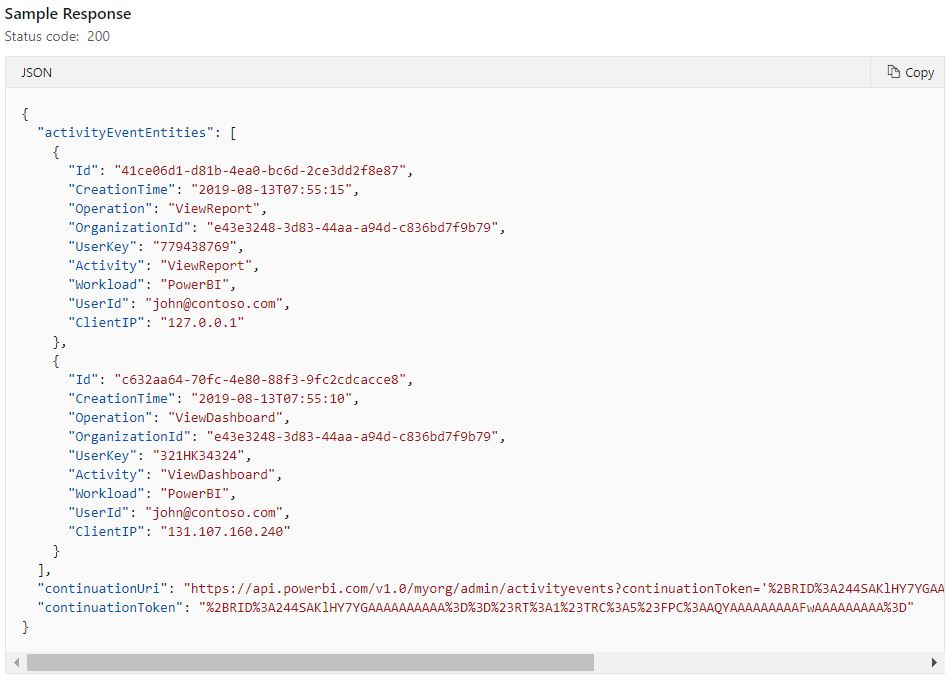
Interestingly, looking at the Microsoft article which announces the new functionality, you’ll notice that the column list in the sample response (shown below) contains all of the same columns as above, but a few more — which is good, as the columns above seemed to be lacking some critical detail.

The differences between these two were a clear indicator that if I wanted to build a data model to capture all of the data sent by the service, I’d need to do trial and error to figure out just what columns were available to us.
The first step in doing this was to look at the columns and identify what column specified what “type” of event it was. Looking at the data, I found this to be the Operation and Activity columns. In my data, I found these two columns to be identical, so I will use them interchangeably below, though I’m focusing on the Activity column for my application.
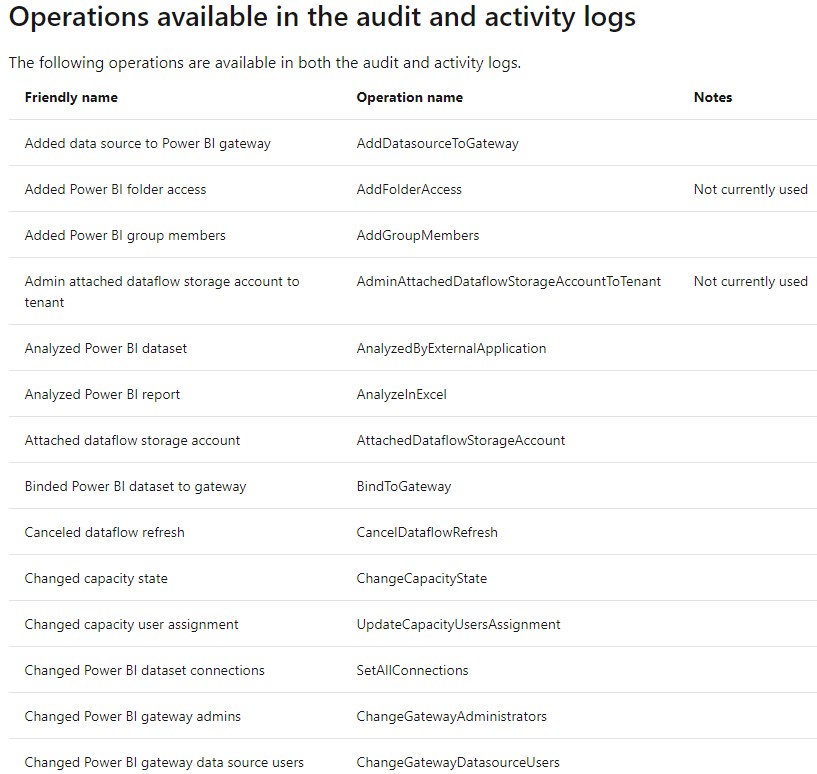
Microsoft publishes a list of all of the available Operations (Activities) here. At the time of this writing, there were 97 listed in the document and I’ve found two (ExportArtifact and ExportActivityEvents which aren’t listed in the document). The “Operation name” column corresponds to the Activity/Operation column in the data.
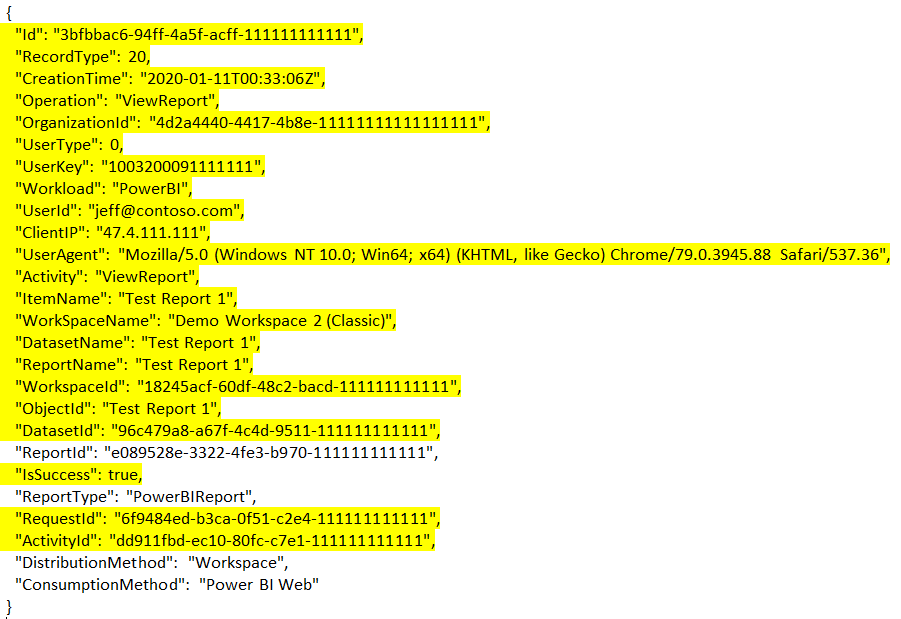
What is interesting with the different Operation / Activity types different columns get included in the output results. Below are the responses for two different Activity Events. The first is “ViewReport” and the second is “CreateDataset.” I’ve highlighted in yellow the columns which are common between the two responses — which, fortunately, is most of them.
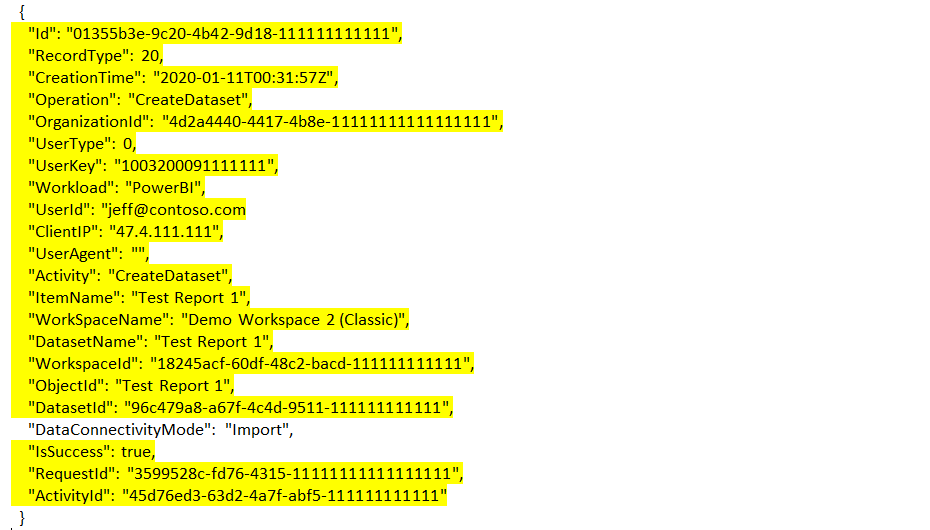
After looking through a number of events, I was able to come up with the following notes. I’m using the term “core column” to indicate a column that is always present, regardless of the Activity type.
- Core column: ItemName seems to be, in most cases, the descriptive name that corresponds best to the Operation / Activity type. For a report activity event, it’d have the report name. For a workspace activity, it’d have the workspace name. This is great and, in my opinion, one of the most useful fields.
- Core column: CreationTime is also incredibly useful, though note that it is in UTC so must be converted to local time.
- Core column: UserId is also incredibly useful, from my observations, this tends to be an email address rather than an ID value.
- Core column: WorkSpaceName is the name of the workspace attributed to the event, if applicable. A basic monitoring application could be made with just this and the three previous columns, if desired.
- While most Operation / Activity type only have 0 – 3 columns which are specific to them, there are a few types which have multiple objects associated with them. An example is the “CreateEmailSubscription” type which can have one or many Subscribee objects associated with it (which contain the name, email address, and ID for each subscription recipient)
- I’m not sure what RecordType translates to, but it seems to always be 20. Also, Workload seems to always be “Power BI”
- I’m not sure what UserType translates to, but it seems to be 0 for normal functions and 2 for administrative functions (like viewing built in usage reporting)
Organizing the Data – Helper Table
The first thing I did to start organizing the data was to take the list of operations published by Microsoft and load it into a SQL Server table. I also added a column to group all of the types together to make future querying easier (for example, grouping all of the event types related to viewing a report together). The current version of the table is available here as a .sql file and here as an Excel .xlsx file.

SQL Table for Activity Events
After collecting a large amount of event data of varying types, I created a distinct list of all of the possible columns used by the events. I’ve compiled those columns into a SQL table below.
CREATE TABLE dbo.PBIActivityLogExtract
(
	ActivityLogINTernalID VARCHAR(50) NULL
	,RecordType INT NULL
	,CreationTime DATETIME NULL
	,Operation VARCHAR(100) NULL
	,OrganizationID VARCHAR(50) NULL
	,UserType INT NULL
	,UserKey VARCHAR(200) NULL
	,[Workload] VARCHAR(100) NULL
	,UserID VARCHAR(500) NULL
	,ClientIP VARCHAR(50) NULL
	,UserAgent VARCHAR(1000) NULL
	,Activity VARCHAR(100) NULL
	,ItemName NVARCHAR(500) NULL
	,ObjectID VARCHAR(500) NULL
	,RequestID VARCHAR(50) NULL
	,ActivityID VARCHAR(50) NULL
	,IsSuccess BIT NULL

	,WorkspaceName NVARCHAR(500) NULL
	,WorkspaceID VARCHAR(50) NULL
	,ImportID VARCHAR(50) NULL
	,ImportSource VARCHAR(50) NULL
	,ImportType VARCHAR(50) NULL
	,ImportDisplayName NVARCHAR(500) NULL
	,DatasetName NVARCHAR(500) NULL
	,DatasetID VARCHAR(50) NULL
	,DataConnectivityMode VARCHAR(200) NULL
	,GatewayID VARCHAR(50) NULL
	,GatewayName NVARCHAR(500) NULL
	,GatewayType VARCHAR(100) NULL
	,ReportName NVARCHAR(500) NULL
	,ReportID VARCHAR(50) NULL
	,ReportType VARCHAR(100) NULL
	,FolderObjectID VARCHAR(50) NULL
	,FolderDisplayName NVARCHAR(500) NULL
	,ArtifactName NVARCHAR(500) NULL
	,ArtifactID VARCHAR(50) NULL
	,CapacityName VARCHAR(200) NULL
	,CapacityUsers NVARCHAR(4000) NULL
	,CapacityState VARCHAR(100) NULL
	,DistributionMethod VARCHAR(100) NULL
	,ConsumptionMethod VARCHAR(100) NULL
	,RefreshType VARCHAR(100) NULL
	,ExportEventStartDATETIMEParameter VARCHAR(50) NULL
	,ExportEventEndDATETIMEParameter VARCHAR(50) NULL

	,ExportedArtifactExportType VARCHAR(50) NULL
	,ExportedArtifactType VARCHAR(50) NULL
	,AuditedArtifactName NVARCHAR(500) NULL
	,AuditedArtifactObjectID VARCHAR(50) NULL
	,AuditedArtifactItemType VARCHAR(50) NULL
	,OtherDatasetIDs VARCHAR(4000) NULL
	,OtherDatasetNames NVARCHAR(4000) NULL
	,OtherDatasourceTypes VARCHAR(4000) NULL
	,OtherDatasourceConnectionDetails VARCHAR(4000) NULL
	,SharingRecipientEmails NVARCHAR(4000) NULL
	,SharingResharePermissions VARCHAR(4000) NULL
	,SubscribeeRecipientEmails NVARCHAR(4000) NULL
	,SubscribeeRecipientNames NVARCHAR(4000) NULL
	,SubscribeeObjectIDs VARCHAR(4000) NULL
)
C# Class Containers for Activity Events
To store all of the different types of Activity Events (that I’ve seen so far) I put together the following C# classes. The PowerBIActivityLogEntity class corresponds with the SQL table above (though I take the liberty of converting some objects into delimited strings to simplify things in my data pulls). I created these classes by pasting sample JSON output into the awesome http://json2csharp.com website, which converts JSON output (the format of a Power BI response) into C# class file definitions.
    class PowerBIActivityLog
    {
        public List<PowerBIActivityLogEntity> activityEventEntities { get; set; }
        public string continuationUri { get; set; }
        public string continuationToken { get; set; }
    }


    class PowerBIActivityLogEntity
    {
        public string Id { get; set; }
        public int RecordType { get; set; }
        public DateTime CreationTime { get; set; }
        public string Operation { get; set; }
        public string OrganizationId { get; set; }
        public int UserType { get; set; }
        public string UserKey { get; set; }
        public string Workload { get; set; }
        public string UserId { get; set; }
        public string ClientIP { get; set; }
        public string UserAgent { get; set; }
        public string Activity { get; set; }
        public string ItemName { get; set; }
        public string ObjectId { get; set; }
        public string RequestId { get; set; }
        public string ActivityId { get; set; }
        public bool IsSuccess { get; set; }


        public string WorkSpaceName { get; set; }
        public string WorkspaceId { get; set; }
        public string ImportId { get; set; }
        public string ImportSource { get; set; }
        public string ImportType { get; set; }
        public string ImportDisplayName { get; set; }
        public string DatasetName { get; set; }
        public string DatasetId { get; set; }
        public string DataConnectivityMode { get; set; }
        public string GatewayId { get; set; }
        public string GatewayName { get; set; }
        public string GatewayType { get; set; }
        public string ReportName { get; set; }
        public string ReportId { get; set; }
        public string ReportType { get; set; }
        public string FolderObjectId { get; set; }
        public string FolderDisplayName { get; set; }
        public string ArtifactId { get; set; }
        public string ArtifactName { get; set; }
        public string CapacityName { get; set; }
        public string CapacityUsers { get; set; }
        public string CapacityState { get; set; }
        public string DistributionMethod { get; set; }
        public string ConsumptionMethod { get; set; }
        public string RefreshType { get; set; }
        public string ExportEventStartDateTimeParameter { get; set; }
        public string ExportEventEndDateTimeParameter { get; set; }

        public List<PowerBIActivityLogDataset> Datasets { get; set; }
        public List<PowerBIActivityLogSharingInformation> SharingInformation { get; set; }
        public List<PowerBIActivityLogDatasource> Datasources { get; set; }
        public List<PowerBIActivityLogSubscribeeInformation> SubscribeeInformation { get; set; }
        public PowerBIActivityLogExportedArtifactInfo ExportedArtifactInfo { get; set; }
        public PowerBIActivityLogAuditedArtifactInformation AuditedArtifactInformation { get; set; }
    }


    class PowerBIActivityLogDataset
    {
        public string DatasetId { get; set; }
        public string DatasetName { get; set; }
    }

    class PowerBIActivityLogSharingInformation
    {
        public string RecipientEmail { get; set; }
        public string ResharePermission { get; set; }
    }

    class PowerBIActivityLogDatasource
    {
        public string DatasourceType { get; set; }
        public string ConnectionDetails { get; set; }
    }

    class PowerBIActivityLogSubscribeeInformation
    {
        public string RecipientEmail { get; set; }
        public string RecipientName { get; set; }
        public string ObjectId { get; set; }
    }

    class PowerBIActivityLogExportedArtifactInfo
    {
        public string ExportType { get; set; }
        public string ArtifactType { get; set; }
        public int ArtifactId { get; set; }
    }

    class PowerBIActivityLogAuditedArtifactInformation
    {
        public string Id { get; set; }
        public string Name { get; set; }
        public string ArtifactObjectId { get; set; }
        public string AnnotatedItemType { get; set; }
    }
Additional Notes for Activity Event Data
There are two event types, ExportActivityEvents and GetDatasources which can be triggered by read operations in the REST API — so reading data creates data. ExportActivityEvents in particular can be very spammy in monopolizing your activity log. Due to the nature of how the API function works, it generates multiple entries for a single “request,” one for each hour. For example, requesting Activity Log data for 1 day, or 24 hours, creates 24 entries as it breaks it down to hourly chunks. I tend to filter these two events completely out of my data for this reason.

Additionally, note that the historical Activity Log data that is available will be subject to the retention settings that apply to the organization and they may be as short as 30 – 90 days of activity data.
Wrap-up
In the next few weeks, I’ll post a sample application written in C# which accesses the Power BI REST API to query for ActivityLog data for a date range and then imports the results into a SQL table.
In the interim, Aaron Nelson has a great simple example here (bottom section) which utilizes the PowerShell Get-PowerBIActivityEvent cmdlet to loop through a series of days and download a JSON file of activity for the day to a file. I found this very helpful in initially downloading files to analyze for unique columns before building my import package.
Posts in Series
- Getting Started with the Power BI API – Querying Power BI with PowerShell
- Getting Started with the Power BI API – Querying the Power BI REST API Directly (with C#)
- Power BI On-premises Gateway Cluster Monitoring (Power Platform API)
- Power BI – Granting Permission to a Custom Application in Azure Active Directory (App Registration)
- Power BI API – Usage Monitoring – Activity Log (Audit Log) Activity Event Data
- Power BI API – Usage Monitoring – Tenant Usage Data with Power BI Activity Log (C# and PowerShell)
- Power BI API – Usage Monitoring – A Power BI Report for Tenant Usage Data
Hi Jeff
I have recently undertaken a very similar exercise and found a few more columns available that you may want to include in your SQL table. For the child JSON elements I included the full element name as part of the column name e.g. Datasets with children became DatasetDatasetId and Folder Access with children became FolderAccessRolePermissions etc.
My list so far:
Id
RecordType
CreationTime
Operation
OrganizationId
UserType
UserKey
Workload
UserId
ClientIP
UserAgent
Activity
ItemName
WorkSpaceName
ReportName
DashboardName
AppName
OrgAppPermission
WorkspaceId
ObjectId
ReportId
DashboardId
AppReportId
AppDashboardId
IsSuccess
ReportType
RequestId
ActivityId
DistributionMethod
ConsumptionMethod
DataConnectivityMode
CapacityId
CapacityName
CapacityUsers
CapacityState
TileId
TileName
TileText
ExportEventStartDateTimeParameter
ExportEventEndDateTimeParameter
FolderObjectId
FolderDisplayName
CustomVisualAccessTokenSiteUri
EmbedTokenId
StorageAccountName
CustomVisualAccessTokenResourceId
ArtifactId
ArtifactName
TableName
DataflowId
DataflowName
DataflowType
DataflowAllowNativeQueries
DatasetId
DatasetName
DatasourceId
DatasourceName
ImportId
ImportSource
ImportType
ImportDisplayName
RefreshType
GatewayId
GatewayName
GatewayType
MentionedUsersInformation
AuditedArtifactInformationArtifactId
AuditedArtifactInformationName
AuditedArtifactInformationArtifactObjectId
AuditedArtifactInformationAnnotatedItemType
DatasetDatasetId
DatasetDatasetName
DatasourceDatasourceType
DatasourceConnectionDetails
ExportedArtifactInfoExportType
ExportedArtifactInfoArtifactType
ExportedArtifactInfoArtifactId
FolderAccessRolePermissions
FolderAccessUserObjectId
MembershipInformationMemberEmail
SchedulesRefreshFrequency
SchedulesTimeZone
SchedulesDays
SchedulesTime
SharingInformationRecipientEmail
SharingInformationResharePermission
SubscribeeInformationRecipientEmail
SubscribeeInformationRecipientName
SubscribeeInformationObjectId
UserInformationUsersAdded
UserInformationUsersRemoved
WorkspaceAccessListWorkspaceId
UserAccessListGroupUserAccessRight
UserAccessListUserEmailAddress
UserAccessListIdentifier
UserAccessListPrincipalType
Regards
Ben
Hi Ben,
Wow, great list! You’ve definitely run into a few more than I have — I’ll have to get these integrated when I have the chance. It’s like a scavenger hunt trying to find all the columns.
Thanks for sharing!
Jeff