SQL Server, Power BI, and other Business Intelligence and data technologies

Month: January 2020

Usage Monitoring with the Power BI API – Activity Log (Audit Log) Activity Event Data

When using the cloud-based Power BI Service, powerbi.com, every action that is taken while logged into the portal — whether it is viewing or publishing a report, creating a new workspace, or even signing up for a pro trial license, that activity is logged within the Microsoft servers as part of the Office 365 audit logs.

Accessing these logs can be accomplished via a couple of different methods (either through the Office 365 Audit Log functionality using the Office 365 Admin Center or PowerShell cmdlets; or through the new Power BI Activity Log (Power BI Get Activity Events) functionality accessible via a PowerShell cmdlet (Get-PowerBIActivityEvent) and an API). There are a few examples out there already on how to use these commands to access the data (and I have a post on accessing the data using the Power BI API and C# coming out in a few week), but there doesn’t seem to be a lot out there about the data itself, which is what I plan to focus on here.

Continue reading

Power BI – Granting Permission to a Custom Application in Azure Active Directory (App Registration)

The Power BI Service, available at powerbi.com, utilizes Azure Active Directory to handle its authentication. This is important to know for creating a custom Power BI application (in any language — C#, Python, etc.) that reads and write from the Power BI REST API. The one exception to this would be using the Power BI PowerShell cmdlets, as they internally, use their own registration mechanism.

This post rehashes and elaborates on the information I touched on in this post, but I wanted to have a dedicated post on just this topic that I could link back to.

So, what is an App Registration? An App Registration is an entry in Azure Active Directory that lets Azure Active Directory know that you will be using a custom application and associates permissions to that application. Additionally, with the addition of permissions, it associates the application to the Azure Active Directory Resource (aka https://analysis.windows.net/powerbi/api). When your application connects to Azure Active Directory, it provides an Application ID (a GUID generated during the registration process) and some form of authentication. Depending on the type of application, the authentication might be user credentials (Delegated Permissions) or a Client Secret or Certificate (Application Permissions).

Continue reading

SQL Saturday Recap: #933 – Nashville, TN

In what has become a yearly tradition, I attended my first SQL Saturday of the year in Nashville — SQL Saturday #933 — Nashville, TN, which took place on Saturday, January 18th, 2020. As with prior years (I’ve attended 4 of their 7 now) the event was well worth the drive from Atlanta.

While the weather wasn’t great (cold and rainy) at least it wasn’t snowy and icy like we’d had in previous years. Fortunately, the entire event takes place indoors — so the cold and gloom outside was easy to ignore with all the action inside. The schedule this year, as usual, was made up of a ton of great options and all of the speakers were fantastic. Lunch in Nashville is always a treat — hot and delicious BBQ and everything was well run and professional.

I had a great time at the event and look forward to attending the 10th anniversary next year!


Morning registration at SQL Saturday 933 – Nashville
Continue reading

Power BI On-premises Gateway Cluster Monitoring (Power Platform API)

Failover clustering and load balancing was introduced to the Power BI On-premises (aka Enterprise Gateway) almost two years ago in the November, 2017 update of the software.

Recently having the need to add redundancy to a configuration of the gateway, I eagerly began researching how to best implement this configuration.

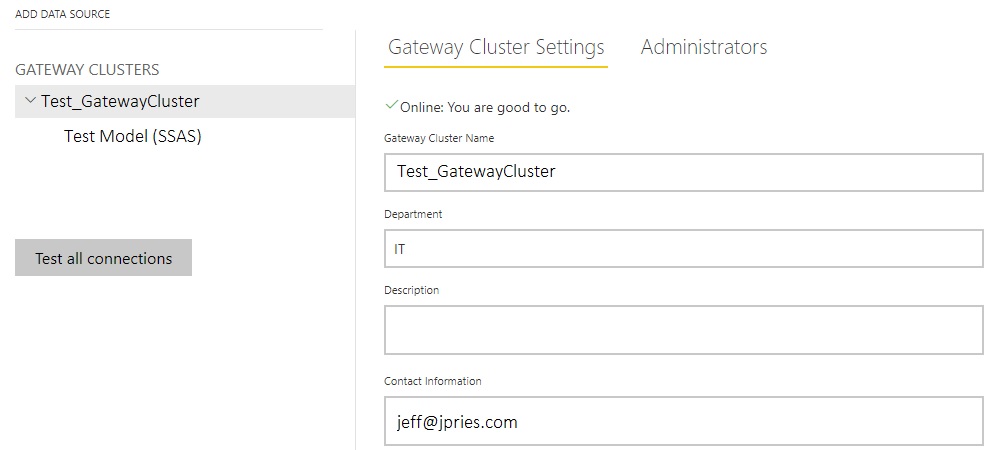
Upon successfully installing a second member to the cluster, it’s interesting to note that there is absolutely no indication in the web interface that the cluster is now two members strong instead of one. Even more interesting is that this has been this way since it was implemented in 2017.

Pop Quiz: How many Gateway Agents are installed in this Cluster? (Did you guess 2? No? Why would you?)

So, how do we see how many agents are installed in our Gateway Cluster and which version of the software is installed on each? PowerShell to the rescue once again!

Continue reading

Getting Started with the Power BI API – Querying the Power BI REST API Directly (with C#)

In my previous post I explored the idea of accessing the Power BI API via PowerShell for the purpose of reading report inventory and other object and configuration information and then loading that exported data into SQL Server tables to query to answer various questions about an organization’s configuration.

In this post, I’m going to do the same thing, but taken to the next level (and going a bit overboard) by accessing the Power BI REST API directly with a C# application I wrote.

This post is targeted toward those already comfortable writing basic programs (C#, Python, or anything capable of making a web request and parsing a JSON response). If this isn’t you, there is no harm in sticking with the PowerShell cmdlets, they’re very capable and fast to get started with. For anyone else, let’s dive in!

Continue reading

© 2026 Jeff Pries

Theme by Anders NorenUp ↑