SQL Server, Power BI, and other Business Intelligence and data technologies

Tag: SQL Server (Page 3 of 4)

Geocaching Analytics – Part 5: GCInsight Visualizations with SSRS

Geocaching Analytics – Part 5: GCInsight Visualizations with SSRS

Continuing our journey of analyzing Geocache data with various visualization tools, we arrive at SQL Server Reporting Services (SSRS).  SSRS is a server-based SQL Server component used for generating static (and generally printer friendly) reports.

Aside from its cost (free), one of the greatest benefits of SSRS is the ease of use in getting started with report creation.

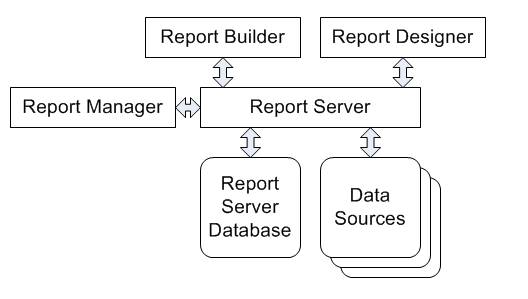
This post won’t cover the installation and configuration of the server-based components of SSRS (there are plenty of resources out there on the Internet and the process varies based on your version and edition of SQL Server).  At its core though, it is made up of the following components:

  • A SQL Server Reporting Database which stores information used by SSRS, including connection information and reports.  This database is initially created by the installation and is managed by the product.
  • The Report Server and Report Manager services, which are the core service behind Reporting Services as well as a web server (running either natively or inside of SharePoint) which allows for the access and administration of reports and report components.
  • Design Tools such as Report Builder and SQL Server Data Tools (Visual Studio)
SSRS conceptual diagram.  Source:  http://www.accelebrate.com/library/tutorials/ssrs-2008

Going into the inner workings of SSRS and report development can go down the rabbit hole of complexity very quickly, so we’ll stop there.  A quick summary is that report design tools create report files which are stored inside of reporting services and can then be accessed via a web browser.  As we’re interested in geocaching visualizations, we’ll be focusing on the content created within the report design tools.

Continue reading

Geocaching Analytics – Part 4: GCInsight Visualizations with Power Map

Geocaching Analytics – Part 4: GCInsight Visualizations with Power Map

Previously, we used various tools to download a copy of our Geocache data from geocaching.com and use a one-time SSIS package via the data import wizard to import that data into a SQL Server database.

Now the fun begins and we can play with some visualizations!  First up, we’ll play with Microsoft’s brand new Power Map functionality for Microsoft Excel.

Power Map is part of the suite of tools which Microsoft has named the Power BI suite.  The Power BI tools, such as Power Map are available in two flavors — on premise and cloud-based as part of Office 365, both of which utilize Excel 2013 Professional Plus.

One interesting note is that Microsoft is attempting to drive traffic to the Office 365 subscription flavor of Power Map over the standalone version.  As such, the standalone version is technically called “Power Map Preview for Excel 2013” but the functionality is the same between both.  The standalone version was originally to be time limited and stop functioning after 5/30/2014, but that limitation has since been removed.

First thing’s first — ensure that you have Power Map (or Power Map Preview) downloaded and installed.  After installing, we’ll need to go into the Excel addins and enable it (as well as PowerPivot which is another tool we’ll use for managing our data)

Continue reading

Geocaching Analytics – Part 3: GCInsight Data Preparation

Geocaching Analytics – Part 3: GCInsight Data Preparation

At this point, we’ve gotten our data downloaded from the Geocaching.com website and we’re sitting on a local treasure trove of data…but the data is contained within a proprietary program (GSAK) which limits our ability to make use of the data.  So, it’s time to work on extracting the data and getting it into a usable format.

The GSAK application will be our primary data source for acquiring Geocaching data as well as future updates to the data.  That being said, the data is not particularly easy to work with in its GSAK format.  Fortunately, GSAK stores its geocache data in a SQLite database, which is a compact database which runs as an application on command rather than a service.

In order to fully utilize the data, we’ll be building a process to export the GSAK data from SQLite into a SQL Server database.  Once the data is exported to SQL Server, we can perform any number of transformations and summarizations.

Continue reading

Getting Started with US Census Data

Getting Started with U.S. Census Data

U.S. Census QuickFacts data is an amazing resource which is available to the public free of charge.  This treasure trove of information is an incredibly useful resource for performing many different types of analysis involving where people live in the United States as well as other demographic information, all of which is broken down by county and state.  While U.S. Census QuickFacts data is available and summarized from multiple sources throughout the Internet, the U.S. Census Bureau makes the information directly available only via flat text files on their web site.  Fear not!  Without too much effort, we can take those flat files and import them into a transaction data source.

In this post, I’ll be covering the process of downing the U.S. Census QuickFacts data from their website (currently data from the 2010 census) and importing it as new tables into an existing SQL Server database using SQL Server Management Studio and a little bit of Microsoft Excel.  I’m using SQL Server 2012 and Microsoft Excel 2013, but any recent version of both should work.

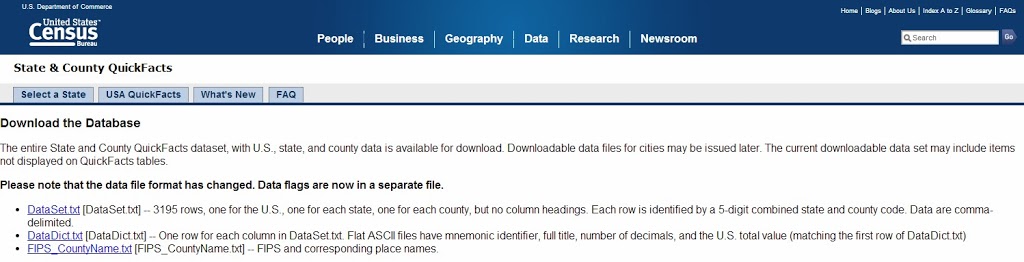
The first step in using U.S. Census QuickFacts data is to download it.  This can be done via the U.S. Census Bureau Website at which there are three files of interest:

  • DataSet.txt — the actual census data in a CSV file
  • FIPS_CountyName.txt — Columns which give the codes for each country and state used within the DataSet file.
  • DataDict.txt — descriptions of what each column name represents.  This file is a useful reference, but we won’t be importing it into our database.

Start things off by downloading the three text files.

U.S. Census data available for download from the Census Bureau website.

Continue reading

Geocaching Analytics – Part 2: GCInsight Data Gathering

Geocaching Analytics – Part 2: GCInsight Data Gathering

This post is going to dive into the details of actually getting the Geocaching data used for later analysis into a convenient and usable source.

Unlike many sample data sources out there, the data is not made (easily) publicly available, though anybody can create a free account and view most of the data on the website.  Getting the data out of the website and into a SQL database is another story altogether…

Some things we’ll need to get started:

  1. Geocaching.com Premium Account – The first step is to upgrade to a Geocaching.com Preimium Account, which as of this writing is currently $20/year.  While geocaching.com does offer free accounts, those accounts cannot see all geocaches (many geocaches are flagged as “premium only”) and they also suffer from data export limitations.
  2. GSAK (The Geocaching Swiss Army Knife) – GSAK is a Windows-based application which is used for downloading and managing Geocache data.  It’s one of the few tools which has the ability to download Geocache data from geocaching.com utilizing the Geocaching.com API (more on that later) and handles de-duplicating and merging cache data.  This handy application is a one-time payment of $30.

There are three primary methods of retrieving data from the geocaching.com website as of this writing:

  1. Built-in Functions (Pocket Queries) – Pocket Queries are the functionality built in to the geocaching.com website for premium members.  They’re intended as a method of gathering a number of geocaches, based on search parameters, and exporting them to a single XML file (the GPX format).  There is a limit of a maximum of 1000 caches that can be returned per query and a maximum of 5 queries that can be run per day.  So, using this method, you can export a maximum of 5,000 caches per day.  One additional limitation is this method will not retrieve caches which have been retired (archived) but remain in the official geocaching.com database for historical purposes.  One strange quirk/weakness to this method is that it will not retrieve the number of favorite points that have been awarded to a cache.
  2. API Queries (GSAK) – Geocaching.com does not make their API publicly available, instead, you must use a program which has access to the API via their partner program.  In this case, that application is GSAK.  GSAK has the ability to download geocaches directly from the geocaching.com website via the API.  The API allows for a maximum of 6,000 caches to be downloaded (with full details) and 10,000 with light details (typically the light details are fine).  This allows for a combined 16,000 caches to be downloaded per day.  Additionally, this will retrieve the number of favorite points that have been awarded to a cache.
  3. Web page scraping – Web page scraping is writing a utility which will retrieve a cache detail web page and then scrape the details off of it.  Since this functions in the same manner as a client would, there is no limit to the number of geocaches which can be downloaded in this manner, however, it does require writing a custom application and updating it every time the geocaching.com site redesigns their cache detail pages.  The c:geo Android app would be an example of this.  We won’t be using this method in this application at this time.

Continue reading

Geocaching Analytics – Part 1: GCInsight, A New Project

Geocaching Analytics – Part 1: GCInsight, A New Project

As you may or may not be aware, I participate in a hobby called Geocaching.  Geocaching has greatly increased in popularity in recent years, so odds are that at this point you’ve at least heard about it.  If you haven’t, a very brief description of it would be a treasure-hunt for technology enthusiasts.  In short, somebody hides a container somewhere (be it in the woods or in an urban setting) and then they post a description on the geocaching.com website which includes attributes about how its hidden as well as coordinates.  You then read the listing on the website, load the coordinates into your GPS, and head out to find it.  If you do find it, you sign the log, enter your find into the website, and possible trade small “treasures.”

I’ll admit, that description sounds a bit weak.  Really, its a fun way to get outdoors and see cool, hidden, or amazing places that you wouldn’t otherwise see (two Georgia highlights include an old abandoned gold mine and a forgotten 1800’s railroad tunnel)

Okay, so why mention this on a business intelligence / sql server topic-heavy blog?

Simple.  By the very nature of this activity, there is tons and tons of really cool information, some of it geospatial, just screaming to be analyzed and visualized.  Geocaching also can get very stats heavy tracking number of finds, on which days or months, and other commonalities between them.

Okay.  So there is a ton of interesting data, just sitting out there in a database.  It seems obvious when you put it that way.  So, why aren’t other people doing anything with this?  The answer is that they are.  There are a lot of people out there doing some pretty cool things with that data.  One example being here and another being here.  But the goal here isn’t necessarily to be unique, but to have fun exploring data.  That said, I believe I do have some ideas to put a unique spin on things.

I’ll be calling this project GCInsight.  This is an entertainment and learning experience rather than a service that I’m setting up.  I’ll go through the steps I performed from start to finish to acquire the data, prepare and export the data, and finally analyze and present the data.

With our project introduced, it’s time to acquire some data…

The Road to SQL Server Certification – Part 5: The End – Exam 70-463

The Road to SQL Server Certification – Part 5: The End – Exam 70-463

Two exams down, one to go to complete the MCSA: SQL Server 2012 series.  And that exam was 70-463: Implementing a Data Warehouse with SQL Server 2012.

At the time of starting my studying for 70-463, I was about 8 months into my SQL certification journey.  I’d been taking my time so far and I planned to do so doubly on this exam due to the huge breadth of material covered on the beast.

70-463 is easily the strangest exam of the series.  Considering my interest in Business Intelligence, the exam didn’t bother me, but I could see how others in more traditional DBA roles would find the material to be very much on the fringe of their areas of responsibilities.  While “Querying” and “Administering” both seemed like natural fits in the MCSA series (which is the lowest level SQL certification), Implementing a Data Warehouse seemed a bit more of a stretch to me.

It doesn’t help matters much that 70-463 should probably be re-titled:  70-463: SSIS, SSIS, and More SSIS (We Hope You Like SSIS).  To say the material is a little bit SSIS-centric would be an understatement!  Sure, there is a little bit of DW design, MDS, and DQS, but it all circles back to SSIS!

Given the breadth of the topics covered for the exam, as well as how little I interact with some of the topics covered (such as MDS and DQS) I planned to spend a longer time than usual studying for this exam — about 6 months or so, putting my target exam date around November or December.  My Second Shot voucher was set to expire on December 31st, so I did have a hard deadline to adhere to.

For preparation, I followed the same system I’d used previously for 70-461 and 70-462 (why fix it if it isn’t broken?) with similar materials:

  • Round 1:  Video Training — The CBT Nuggets 70-463 Series, taught by Garth Schulte, clocks in at about 12 hours which is on par with the others in the series.  These videos do an excellent job of laying the foundation and covering all of the exam topics in a very demo heavy setting.  The series is very very heavy on SSIS demos (since the exam content is very heavy on SSIS), but also includes some great info on other features such as MDS and DQS installation and usage.
  • Round 2:  Books and Labs — Much like with the 70-461 and 70-462 exams, I found the Microsoft Press book, Training Kit (Exam 70-463) to be incredibly useful.  This Microsoft Press book was well organized and well-written, comes with a PDF version, and comes with a pretty good and exam-relevant bank of electronic sample questions.  In the case of many exams, 3rd party books tend to be better preparation materials than the official Microsoft books (as they can sometimes be quite dry) but the Microsoft books were spot on for this series.  Another excellent book I used for preparation was Knight’s Microsoft SQL Server 2012 Integration Services 24-hour Trainer, which I happened to pick up a signed copy of at PASS Summit 2013.
  • Round 3:  Practice Tests — 70-463 had been out for a while by the time I got to this point, so there were a couple of good reputable practice test engines available for use.  As always, the practice questions included with the Microsoft 70-463 Training Kit were an excellent resource.  Additionally, the Transcender Practice Questions were very comprehensive and give excellent explanations as to why an answer choice is right (and why the others are wrong).  A handy bonus of having a corporate CBT Nuggets subscription is that Transcender practice questions are included for free…a handy perk!
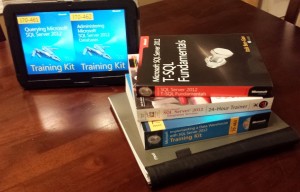
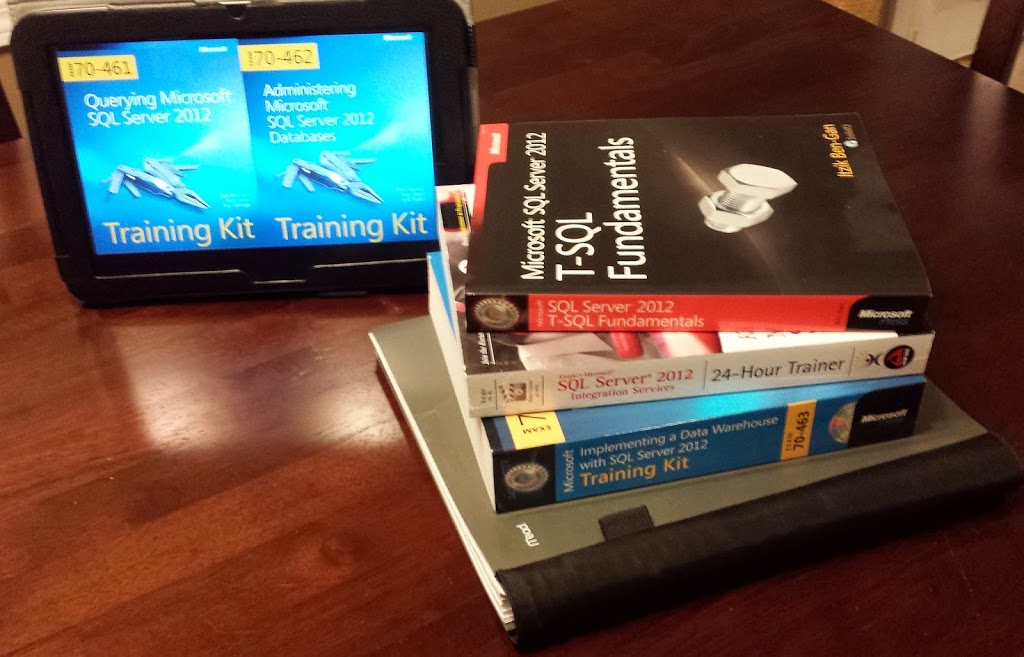
Books, books, and more books!

With the craziness of November and December upon me, I had to push my exam date much further back than I’d originally planned.  I finally sat the exam on the 23rd, just days before the expiration of my voucher.  Fortunately, my preparation did the trick and I was able to walk away with a pass and could relax over the holidays rather than cram again.

The 70-463 exam followed a familiar format to 70-461 and 70-462.  If you’ve taken both of those, you know fully what to expect.  For a little bit of a rant, however, Microsoft exams these days seem to make heavy use of what Microsoft calls “Repeated Answer Choice” questions in which a question is presented in 2-3 sentences and then a large number of options, say 10-12, are given and you must choose the correct one.  They then have 3-5 copies of the question with slight variations in the wording of the original question as well as potentially in the answer choices.  Each question doesn’t relate to the last, so you could potentially choose the same answer over and over.  I’m not sure what the test benefit to this style of question is (I’m sure there is one…some pretty smart people design these things with a lot of science), however, to me, the consumer, they just feel like the test-maker got lazy.  Long tests are already pretty exhausting, but getting what feels like the same question over and over which is really easy to misread a key word, just seems to compound that exhaustion without a lot of apparent benefit.  Rant completed!

I’m relieved to have completed my three-exam MCSA: SQL Server 2012 series and have certainly learned a lot in the process.  Now I look forward to a period of rest and relaxation and using some of my new-found skills.

[ Go back to Part 4 ]

The Road to SQL Server Certification – Part 4: Exam 70-462

The Road to SQL Server Certification – Part 4: Exam 70-462

With my first SQL Server 2012 exam, 70-461 under my belt, I revisited 70-462 for attempt number two, this time with much more preparation and ultimately much better results.

Exam 70-462: Administering Microsoft SQL Server 2012 Databases is the most DBA-focused exam of the bunch.  It covers everything from setting up and maintaining SQL server to more advanced topics like various methods of failover clustering.

Despite the fact that most people install SQL server before they begin querying it (and hence have experience with 70-462 material before 70-461: Querying SQL Server material), I felt that 70-462 was a more difficult exam than 70-461.  This was likely largely in part due to two things:

  1. A seemingly wider breadth of topic area…more topics is more material to cover
  2. A heavy reliance on enterprise level features which are used in the real world far less frequently than features from lesser editions.  Specifically, brand new features such as AlwaysOn Failover Clustering.

That being said, after a little bit of a break from 70-461, I attacked the preparation for this exam with a methodology and timeline similar to what I’ve used for 70-461 and other exams:

  • Round 1:  Video Training — The CBT Nuggets 70-462 Series, taught by Garth Schulte, were the longest videos of the MCSA series, but still pretty manageable at around 13 hours.  These videos do an excellent job of laying the foundation and covering all of the exam topics in a very demo heavy setting.  Lots of demos on various backup and restore scenarios as well as all of the different fail-over methods were welcome, as these were favorite topics on the exam.
  • Round 2:  Books and Labs — Much like with the 70-461 exam, I found the Microsoft Press book, Training Kit (Exam 70-462) to be incredibly useful.  This Microsoft Press book was well organized and well-written, comes with a PDF version, and comes with a pretty good and exam-relevant bank of electronic sample questions.  In the case of many exams, 3rd party books tend to be better preparation materials than the official Microsoft books (as they can sometimes be quite dry) but the Microsoft books were spot on for this series.Additionally, this exam in particular really lent itself to setting up a virtual environment and performing many of the exercises.  The Microsoft Press book gives a guide to configuring a lab environment on virtual machines which includes an Active Directory domain controller, a couple of SQL Servers running on full GUI windows and a couple of SQL Servers running on Windows Serve Core.  Due to the number of machines involved, visualization is highly recommended.  I had an old server on which I ran VMware ESXi (Free Edition) for my virtual machines, but VMware Player (which can also create VMs) is another great free resource if you don’t have server hardware handy.
  • Round 3:  Practice Tests — Being the oldest of the three exams in the series, 70-462 had a couple of good reputable practice test engines available for use.  As always, the practice questions included with the Microsoft 70-462 Training Kit were an excellent resource.  Additionally, the Transcender Practice Questions were very comprehensive and give excellent explanations as to why an answer choice is right (and why the others are wrong).  A handy bonus of having a corporate CBT Nuggets subscription is that Transcender practice questions are included for free…a handy perk!

Having completed the preparation as well as a little exam familiarity from the beta exam, I was able to complete the exam successfully to wrap up exam number two of three on the path to MCSA: SQL Server 2012.  Now, on to 70-463!

[ Go back to Part 3 | Go forward to Part 5 ]

The Road to SQL Server Certification – Part 3: Exam 70-461

The Road to SQL Server Certification – Part 3: Exam 70-461

The 70-461 exam was, surprisingly, my favorite of the two exams I’ve taken so far.  The subject matter for the exam is querying SQL Server, which means lots and lots of T-SQL.

Initially, 70-461: Querying Microsoft SQL Server 2012 was the exam I feared the most, as my previous experience with Microsoft exams involving lots of syntax (Powershell) were pretty evil.  It’s really easy to make syntax-based exams very difficult.  But it turns out, this exam wasn’t so bad…not so bad at all.

I prepared for the exam using the tried and true method which I’ve developed for myself over the years.  Typically, the process takes me about 3 months to complete at a leisurely pace (allowing real life to interject where necessary):

  • Round 1:  Video Training — I like to start off a subject with video based training.  Usually, CBT Nuggets whenever they have a relevant series available.  We’re fortunate enough to have a corporate subscription to this resource, but the one-month subscription is pretty affordable in a pinch.  Generally speaking, a series will be around 20 hours in length, broken up over 20-ish parts and they really focus on teaching the material in a demo-heavy environment rather than just drilling practice questions.

The CBT Nuggets 70-461 Series, taught by Garth Schulte, clocks in at a very manageable 12 hours, but it does an excellent job of covering all of the exam topics — especially some of the more foreign ones which the exam was heavy on:  XML queries, merges, and window functions.

  • Round 2:  Books and Labs — I’ll typically follow a video series by either reading a book or at least picking through and reviewing the more complex or foreign chapters.  This lets me focus and get more detail on individual topics which I don’t have a deep knowledge in already or that I think the exam will focus on.In the case of the 70-461 exam, I found the Microsoft Press book, Training Kit (Exam 70-461) to be incredibly useful.  After all Itzik Ben-Gan is one of the authors!  This Microsoft Press book was well organized and well-written, comes with a PDF version, and comes with a pretty good and exam-relevant bank of electronic sample questions.  Additionally, I already had Itzik’s T-SQL Fundamentals book on hand, which was another excellent resource.
  • Round 3:  Practice Tests — For the final round of my preparation routine, I move on to drilling practice tests.  I’ll typically use 1-2 resources, depending on what is available, and run through their question banks until I’ve got them as well as the “why” of the questions pretty well mastered.At the time, the 70-461 exam was fairly new, so my primary go-to resource, Transcender, wasn’t out yet.  Fortunately, the test question simulator included with the Microsoft Press book was good enough that I didn’t need the Transcender practice questions.  As a matter of fact, I bought the Microsoft Press book primarily for the practice questions, since I knew Transcender nor any other reputable provider had released their practice exams yet.

With my three-pronged preparation completed, it was time to actually sit the exam.  It’s difficult to discuss too much about the exam itself, since its covered by NDA, but with any Microsoft exam, it’s always a safe bet to really learn the stuff that’s new or greatly improved with that edition.  I was glad I’d spent a lot of time on XML queries, merge statements, and window functions!

A useful bit of information for anybody who has yet to take a Microsft exam or SQL Server 2012 exam, this transcender blog post lists examples of the current styles of questions Microsoft uses on its exams with a “safe” example of each type.  A new type of question for the SQL Server 2012 exams is the “Repeated answer choices” question…which I absolutely loathe.  But more on that later!

I was fortunate to pass the exam on my first try (though I had a 2nd Shot available if I needed it) and looking back on the series, I can say that I’m pretty confident that this was the easiest exam of the series, likely due to the fairly narrow breadth of the subject matter (unlike 70-463).  Now, on to 70-462!

[ Go back to Part 2 | Go forward to Part 4 ]

The Road to SQL Server Certification – Part 2: Progress So Far

The Road to SQL Server Certification – Part 2: Progress So Far

In Part 1 of my Road to SQL Server Certification series, I covered a little bit of background on my experience with certifications in general as well as Microsoft’s path for MCSA: SQL Server 2012.

I am currently in the final preparation and studying stages for, in my opinion, the most difficult exam in the series, the third in the series, 70-463: The Widowmaker…er, Implementing a Data Warehouse with SQL Server 2012.  That’s what I meant, but more on that in a little bit.

My SQL Server 2012 certification journey started with 70-462: Administering Microsoft SQL Server 2012 Databases.  In my opinion, this is the most natural starting point for someone with a strong IT background, whereas 70-461: Querying Microsoft SQL Server 2012 is the most natural starting point for someone with a strong development background.  But then again, the indexing T-SQL topics covered on 461 are helpful to know going into 462, but I digress…

70-462: Administering Microsoft SQL Server 2012 Databases was my first experience with a SQL certification exam.  I was about a 1/3 complete studying for the equivalent SQL 2008 version of this exam when the 70-462 beta was released.  In recent years, Microsoft has performed fewer and fewer public beta exams, but if you ever get the opportunity to take one, and know something of the subject material, I highly recommend it!  Essentially, Microsoft offers the exam(s) for free for a limited number of time and seats.  The exam you take is similar to what the final version will be, but longer and with rougher edges.  If you pass it, you get credit for having passed the final version without spending a dime, and if you don’t, at least you have an idea of what the final version will likely be like.

I took the beta version of 70-462 as my first exam.  They don’t tell your your score on these, in fact, they mail you the results a number of agonizing weeks later, but I know I didn’t pass.  I feel like I failed it pretty badly.  It was a much more difficult exam than I’d anticipated.

Months later, with all of the final versions released to the public, I decided to try again, this time starting with 70-461: Querying Microsoft SQL Server 2012 instead.  I had two reasons for changing tactics:  1) Microsoft numbered it lower, probably for a reason, so I should take their advice and start here.  And most importantly, 2.) one of the resources I really like to use to learn for an exam, CBT Nuggets, had just released their 70-461 videos and the 70-462 and 70-463 videos were in production, but not yet released.  So, my plan was now to take 70-461 then 70-462, and finally 70-463.

In my journey so far, I’ve successfully completed 70-461 and 70-462 and am getting ready to take 70-463 before the year is out.  In the next part of this series, I’ll talk about the 70-461 exam itself and my experiences preparing for and sitting it.

[ Go back to Part 1 | Go forward to Part 3 ]
« Older posts Newer posts »

© 2026 Jeff Pries

Theme by Anders NorenUp ↑