SQL Server, Power BI, and other Business Intelligence and data technologies

Tag: SQL Server (Page 2 of 4)

Learning MDX Part 2 – Let’s Get Visual

ssaslogoMost introductions start with an explanation of cubes and MDX and then work their way toward the syntax and structure of a query and then start to cover the various syntax options in increasing difficulty.  While that is a great approach, sometimes you just need to get going right away.  Fortunately, MDX actually has a few good visual methods of querying an existing cube to access data without necessarily needing to know the syntax and theory (however, that doesn’t hurt!).  This post is going to cover a few of the visual methods of querying a multidimensional analysis services cube.

All that being said, it does still help to understand the structure of your data and the various relationships before trying to query it.  I’m using the Adventure Works 2014 Data Warehouse and Analysis Services data sets (previously discussed here).  The Adventure Works 2014 Data Warehouse contains a number of different fact tables and related dimensions.  I primarily use FactInternetSales (and its related dimensions) which is data for the Internet Sales of Adventure Works.  The diagram for the relational data warehouse database can be seen below.

Adventure Works 2014 Data Warehouse Internet Sales diagram


Adventure Works 2014 Data Warehouse Internet Sales diagram

Continue reading

Learning MDX – Resources

ssaslogoThis post serves as a full reference of all of the resources I used while on my journey to learn MDX / SSAS Multidimensional.  I’ll try to keep this post updated with an index of resources as I consume them.  Some will be free, some will not, I’ll note which are which.

Continue reading

Learning MDX Part 1 – Introduction and Environment

ssaslogo

Recently I had the need to start learning MDX to query against an existing Microsoft SQL Server Analysis Services (SSAS) cube. As this can be a long and difficult journey, I thought it’d be useful to make notes about specific things I learn as well as to list and review resources I find along away. I will be paying special attention to using MDX with SQL Server Reporting Services (SSRS) as this is a very common usage scenario, but one in which there are sparse learning resources.

I’ll try to keep this post updated with an index of resources as I consume them.  Some will be free, some will not, I’ll note which are which.  But first, some housekeeping:

Continue reading

PASS Summit 2015 Recap — My Third Summit

PASS_2015_200x200Now in my third year, I recently attended PASS Summit in Seattle, Washington.  This was my second visit to Seattle for PASS Summit, with my first Summit experience in Charlotte, NC.  Having experience my “first time in Seattle for Summit” last year, I had a pretty good idea of where things were and what things would be going on and when and for the most part, things followed the previous year’s pattern very closely.

I arrived in Seattle a few days early so I could work some sightseeing in.  While it’s generally not a good idea to try to have a rental car during the conference, in the days leading up to the conference when you want to see a lot of places, it’s the way to go.  I rented a car from the airport and made my way down to Portland for a couple of nights.

I spent my first two days of vacation, Saturday and Sunday doing some geocaching and exploring the Portland area.  The weather was overcast but nice the first day and lots of rain the second day.  I’d really wanted to see Mt. Hood, but unfortunately the weather didn’t cooperate at all.

Mt. Rainier while driving down to Portland after arriving in Seattle

Mt. Rainier while driving down to Portland after arriving in Seattle

Continue reading

Sample Data — An Intro to Adventure Works

AdventureWorks-Logo_blogSample Data — An Intro to Adventure Works

From time to time, it’s handy to have access to some good, solid sample data.  Now, actually coming up with a robust set of sample data that has no tie back to any proprietary business data can actually be a tricky prospect.  It’s easy to generate a small amount of good data yourself, or a large amount of really random data, but neither of these are very robust.  Fortunately, Microsoft comes to the rescue with their fictional company, Adventure Works, and the Adventure Works Databases.

Microsoft provides the following bio for the Adventure Works company over at Technet:

Adventure Works Cycles, the fictitious company on which the AdventureWorks sample databases are based, is a large, multinational manufacturing company. The company manufactures and sells metal and composite bicycles to North American, European and Asian commercial markets. While its base operation is located in Bothell, Washington with 290 employees, several regional sales teams are located throughout their market base.

In 2000, Adventure Works Cycles bought a small manufacturing plant, Importadores Neptuno, located in Mexico. Importadores Neptuno manufactures several critical subcomponents for the Adventure Works Cycles product line. These subcomponents are shipped to the Bothell location for final product assembly. In 2001, Importadores Neptuno, became the sole manufacturer and distributor of the touring bicycle product group.

Coming off a successful fiscal year, Adventure Works Cycles is looking to broaden its market share by targeting their sales to their best customers, extending their product availability through an external Web site, and reducing their cost of sales through lower production costs.

In addition to providing a realistic scenario for the Adventure Works company and a database full of realistic sample data, Microsoft continually updates the Adventure Works database for new versions of SQL Server and makes numerous variations of the databases available to highlight different technologies.

Continue reading

Importing Cisco Call Data into SQL Server with SSIS

cisco_phoneRecently, I had the need to analyze phone call data to answer questions such as how many phone calls were received in a given day and how frequently voicemail answered instead of a live person.  In this scenario, I was fortunate enough to have a fairly accessible phone system to work with — a Cisco UC520.  While this guide is specific to working with a Cisco UC520 device, most Cisco phone systems (the UC series or anything utilizing CUE/CME) should be pretty comparable.

So, you want to be able to analyze Cisco call data?  Well, you’re in luck!  There are three major steps to this process:

  1. Extract raw call data from the phone system
  2. Capture the exported data and interpret it
  3. Insert it into SQL Server and perform reporting

This won’t be a complete step-by-step guide, but I’ll try to hit all the high points and am always open to questions.

Continue reading

Windows 10 Upgrade – Part 5: SSRS Report Preview Error in SSDT-BI

Windows 10Having just recently successfully installed the current release of SSDT-BI (the current version as of this writing is based on SQL Server 2014 32-bit and the Visual Studio 2013 Integrated Shell), it was time to finally open up some SSRS (SQL Server Reporting Services) projects and get to work.

For anyone that use used the report Preview button within SSDT-BI, you know getting it to work can be a bit dicey.  Microsoft has changed the internal behavior of what happens behind the scenes when the preview button is pressed, and that has created a number of problems.

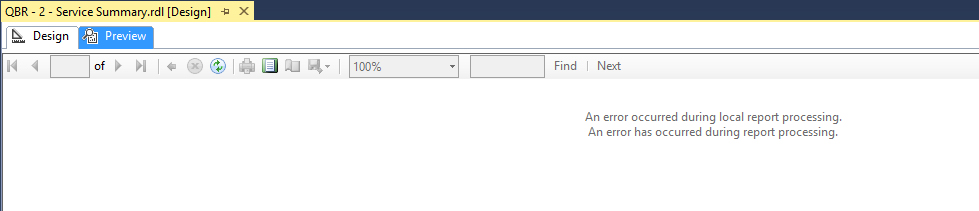
No surprise, the first time I pressed the preview button, I was greeted with this:

Report Preview error in SSDT-BI

Report Preview error in SSDT-BI

Well, that’s not good.  I should preface this by saying that I did two significant things to ultimately resolve this issue.  It’s possible that only the second one was needed, but I’m going to list them both (as well as a workaround) just in case it’s helpful.

Continue reading

Windows 10 Upgrade – Part 4: Cannot Install SSDT-BI (Install Error)

Windows 10With all of my driver, aesthetic, and networking issues worked out in previous parts, it was time to get down to business.  After all, I’m going to have to do some work from this laptop at some point, right?  And in the Microsoft Business Intelligence world, that means I’m going to need SSDT-BI (SQL Server Data Tools – Business Intelligence).  As of this writing, the current version of SSDT-BI is still based on SQL Server 2014 32-bit with the Visual Studio 2013 Integrated shell.  It’s expected at some point, with the release of 2016, there’ll be a new and improved version more tightly integrated into Visual Studio 2015, but for now, if you want to edit SSRS projects, this is the way to go.

I started out by downloading the currently release of SSDT-BI, which is 32-bit only (regardless if you’re using a 64-bit machine).

I encountered my first minor hurdle during the initial install.  Since SSDT-BI is based on SQL Server 2014 32-bit, it doesn’t play nice with SQL Server 2014 64-bit.  I wasn’t thinking clearly and when presented with the option to “Perform a new installation” or “Add features to an existing instance,” I first tried to add features and the installer yelled at me for having an incompatible installation already in place (SQL Server 2014 64-bit).  So the correct answer is Perform a new installation, which will put these 32-bit components side-by-side with any existing 64-bit components.

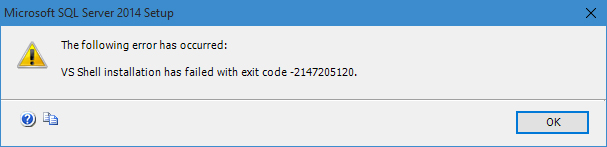
After selecting the right installation type and checking the box for the SQL Server Data Tools – Business Intelligence for Visual Studio 2013 shared feature to install, I thought I was on easy street.  Boy was I wrong, the fun was just beginning.  While the installer was running, it eventually failed with this error:

SSDT-BI Install Error - VS Shell Installation has failed with exit code -2147205120

SSDT-BI Install Error – VS Shell Installation has failed with exit code -2147205120

That’s not good.  I immediately tried all the basic IT things before going deeper.  I rebooted and retried the installation, this time running as administrator.  Same error.  Time to go deeper.

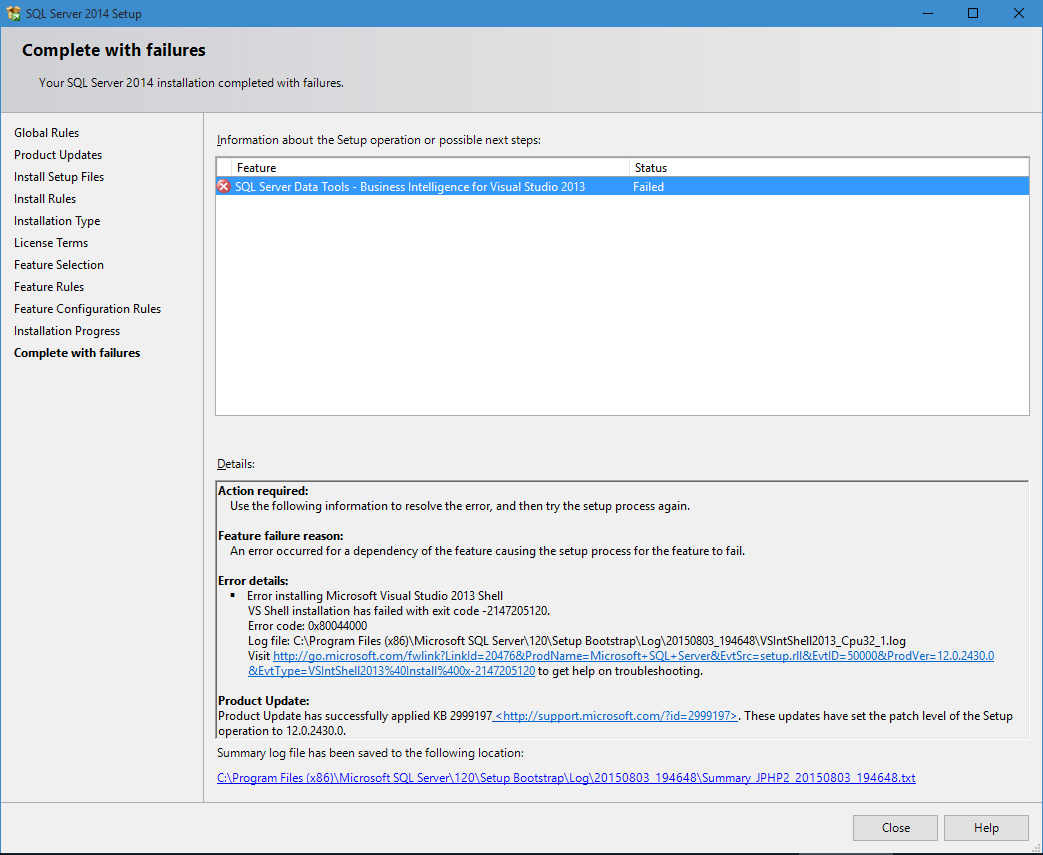
Following the error dialog is more detail regarding the error.  To any developer that writes an installer that includes the option to view detailed log files….THANK YOU.

SQL Server Data Tools - Business Intelligence for Visual Studio 2013 installation completed with failures

SQL Server Data Tools – Business Intelligence for Visual Studio 2013 installation completed with failures

Continue reading

A Modern Day Balloon Race (GCInsight Geocaching Analytics – Part 6)

GCInsightA Modern Day Balloon Race (Geocaching GCInsight Analytics – Part 6)

They’re not as popular as they once were, mostly for environmental reasons, but when I was in elementary school, balloon races were annual events which were tons of fun.  For anyone that hasn’t had the experience in participating in a balloon race, each participant gets a regular helium balloon with an attached string and postcard.  They’re all released at once and the balloons spread sometimes hundreds of miles.  If a postcard is found, it’s reported or mailed back and whichever one gets found the furthest away wins.  While balloon races are great fun, there are some environmental concerns with releasing hundreds of balloons (which essentially become trash) regularly into the wild.

Balloons released in a balloon race

Balloons released in a balloon race

So, what is a more modern and environmental way to have the same kind of fun?  Believe it or not, Geocaching has the answer.  Geocaching is a game in which millions of physical containers are hidden throughout the world.  These containers are tracked on a website which, with each listing, contains GPS coordinates of the geocache and an inventory of what is inside it. Trackables, or travel bugs, are physical items, each of which has a unique tracking code, which can be placed inside of a geocache.  Each trackable item maintains a history of the geocaches (and their locations) that it has been placed within — and that becomes a virtual balloon for our balloon race.

Continue reading

PASS Summit 2014 Roundup — Second Summit, First in Seattle

PASS Summit 2014 Roundup — Second Summit, First in Seattle

Last year, I attended my first PASS Summit in Charlotte, NC and I was hooked immediately.

This year, Summit returned to its usual home in Seattle, WA, and despite the 2,200 miles from Atlanta, GA to Seattle, WA, I knew I had to go!  I’ve only visited Seattle once previously — and that was for a very brief visit after a grueling hike of the West Coast Trail in Vancouver, CA so I welcomed the opportunity to spend some actual time in the Pacific Northwest to see the sites.  Regardless of the venue, PASS Summit is a very difficult proposition to pass up.

Once again, this year, I took advantage of the early registration for Summit, where the cost to register is almost half of what the final cost can be…yikes.  Early registration is open once again this year, and goes until January 11th, 2015.  I’ll probably take advantage of this as well again this year, once it gets a little closer.

Continue reading

« Older posts Newer posts »

© 2026 Jeff Pries

Theme by Anders NorenUp ↑