SQL Server, Power BI, and other Business Intelligence and data technologies

Tag: Data Visualization (Page 2 of 2)

Geocaching Analytics – Part 2: GCInsight Data Gathering

Geocaching Analytics – Part 2: GCInsight Data Gathering

This post is going to dive into the details of actually getting the Geocaching data used for later analysis into a convenient and usable source.

Unlike many sample data sources out there, the data is not made (easily) publicly available, though anybody can create a free account and view most of the data on the website.  Getting the data out of the website and into a SQL database is another story altogether…

Some things we’ll need to get started:

  1. Geocaching.com Premium Account – The first step is to upgrade to a Geocaching.com Preimium Account, which as of this writing is currently $20/year.  While geocaching.com does offer free accounts, those accounts cannot see all geocaches (many geocaches are flagged as “premium only”) and they also suffer from data export limitations.
  2. GSAK (The Geocaching Swiss Army Knife) – GSAK is a Windows-based application which is used for downloading and managing Geocache data.  It’s one of the few tools which has the ability to download Geocache data from geocaching.com utilizing the Geocaching.com API (more on that later) and handles de-duplicating and merging cache data.  This handy application is a one-time payment of $30.

There are three primary methods of retrieving data from the geocaching.com website as of this writing:

  1. Built-in Functions (Pocket Queries) – Pocket Queries are the functionality built in to the geocaching.com website for premium members.  They’re intended as a method of gathering a number of geocaches, based on search parameters, and exporting them to a single XML file (the GPX format).  There is a limit of a maximum of 1000 caches that can be returned per query and a maximum of 5 queries that can be run per day.  So, using this method, you can export a maximum of 5,000 caches per day.  One additional limitation is this method will not retrieve caches which have been retired (archived) but remain in the official geocaching.com database for historical purposes.  One strange quirk/weakness to this method is that it will not retrieve the number of favorite points that have been awarded to a cache.
  2. API Queries (GSAK) – Geocaching.com does not make their API publicly available, instead, you must use a program which has access to the API via their partner program.  In this case, that application is GSAK.  GSAK has the ability to download geocaches directly from the geocaching.com website via the API.  The API allows for a maximum of 6,000 caches to be downloaded (with full details) and 10,000 with light details (typically the light details are fine).  This allows for a combined 16,000 caches to be downloaded per day.  Additionally, this will retrieve the number of favorite points that have been awarded to a cache.
  3. Web page scraping – Web page scraping is writing a utility which will retrieve a cache detail web page and then scrape the details off of it.  Since this functions in the same manner as a client would, there is no limit to the number of geocaches which can be downloaded in this manner, however, it does require writing a custom application and updating it every time the geocaching.com site redesigns their cache detail pages.  The c:geo Android app would be an example of this.  We won’t be using this method in this application at this time.

Continue reading

Geocaching Analytics – Part 1: GCInsight, A New Project

Geocaching Analytics – Part 1: GCInsight, A New Project

As you may or may not be aware, I participate in a hobby called Geocaching.  Geocaching has greatly increased in popularity in recent years, so odds are that at this point you’ve at least heard about it.  If you haven’t, a very brief description of it would be a treasure-hunt for technology enthusiasts.  In short, somebody hides a container somewhere (be it in the woods or in an urban setting) and then they post a description on the geocaching.com website which includes attributes about how its hidden as well as coordinates.  You then read the listing on the website, load the coordinates into your GPS, and head out to find it.  If you do find it, you sign the log, enter your find into the website, and possible trade small “treasures.”

I’ll admit, that description sounds a bit weak.  Really, its a fun way to get outdoors and see cool, hidden, or amazing places that you wouldn’t otherwise see (two Georgia highlights include an old abandoned gold mine and a forgotten 1800’s railroad tunnel)

Okay, so why mention this on a business intelligence / sql server topic-heavy blog?

Simple.  By the very nature of this activity, there is tons and tons of really cool information, some of it geospatial, just screaming to be analyzed and visualized.  Geocaching also can get very stats heavy tracking number of finds, on which days or months, and other commonalities between them.

Okay.  So there is a ton of interesting data, just sitting out there in a database.  It seems obvious when you put it that way.  So, why aren’t other people doing anything with this?  The answer is that they are.  There are a lot of people out there doing some pretty cool things with that data.  One example being here and another being here.  But the goal here isn’t necessarily to be unique, but to have fun exploring data.  That said, I believe I do have some ideas to put a unique spin on things.

I’ll be calling this project GCInsight.  This is an entertainment and learning experience rather than a service that I’m setting up.  I’ll go through the steps I performed from start to finish to acquire the data, prepare and export the data, and finally analyze and present the data.

With our project introduced, it’s time to acquire some data…

My New Favorite Chart — Overlapping Bar Charts

My New Favorite Chart — Overlapping Bar Charts

Back in April, I had the pleasure of attending Jason Thomas’s (B | T) Advanced Charting Techniques in SSRS at SQL Saturday #220 in Alpharetta, GA.

During this session, I was introduced to my new favorite SSRS visualization — the Overlapping Bar Chart.

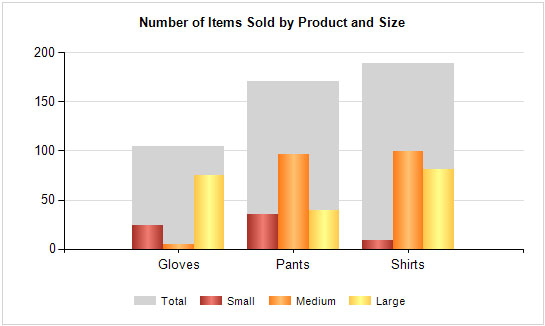
The overlapping bar chart is really just a standard bar chart with a range chart in the background.  The range chart in the background represents the sum of the bars in the foreground.  This allows you to see very quickly the total amount for a category as well as a quick breakdown of the parts that make up that total.

To create an overlapping bar chart, you will first need some data.  The data should have a category (such as dates or products) and then a couple of quantity columns and finally a total column which sums the quantity column.

Continue reading

Newer posts »

© 2026 Jeff Pries

Theme by Anders NorenUp ↑