
T-SQL Date Dimensions with ConnectWise PSA
ConnectWise PSA is a Microsoft SQL Server OLTP-based application commonly used by IT Managed Services Providers for managing their businesses. ConnectWise provides a mechanism for entering and storing service tickets, time worked by technicians on service tickets, sales items, client billing, and other finance information. For any Managed Services Provider, it tends to be the heart of the business.
A Date Dimension is a concept typically used in a Data Warehouse for implementing Time Intelligence which allows for querying on say “year to date” or for the quarter. A Date Dimension is created through the creation of a Date Table. A Date Table is a table which contains every date for a time period (with no gaps within) and numerous properties for each date. Some of the most common properties are:
- The Date, as a DATE or DATETIME
- The DateKey, which is an INT that shows the date in YYYYMMDD form
- Whether or not the date is a work day or not
- Numerous date parts of the date, such as the month number, month name, day of the week, week number, quarter, year, and many more.
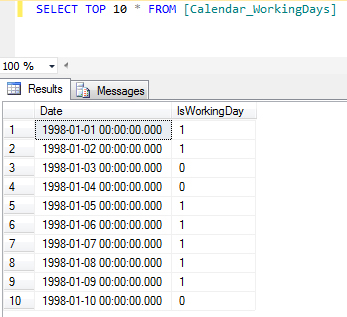
By using this table as a source of dates, we can create a robust DateTable which includes whether or not the day is a work day with a minimal amount of effort:
SELECT
CONVERT(DATE, Date) AS DateKey,
CAST(CONVERT(VARCHAR, Date, 112) AS INT) AS DateInt,
DATEPART(yy, Date) AS YearKey,
DATEPART(qq, Date) AS QuarterOfYear,
DATEPART(mm, Date) AS MonthOfYear,
DATEPART(dd, Date) AS [DayOfMonth],
DATENAME(mm, Date) AS [MonthName],
LEFT(DATENAME(mm, Date), 3) AS MonthNameAbbr,
LEFT(DATENAME(mm, Date), 3) + ‘ ‘ + CONVERT(nvarchar, DATEPART(yy, Date)) AS MonthInCalendar,
‘Q’ + CONVERT(NVARCHAR, DATEPART(qq, Date)) + ‘ ‘ + CONVERT(nvarchar, DATEPART(yy, Date)) AS QuarterInCalendar,
DATENAME(dw, Date) AS DayOfWeekName,
LEFT(DATENAME(dw, Date), 3) AS DayOfWeekNameAbbr,
DATEPART(dw, Date) AS DayInWeek,
DATENAME(wk, Date) AS WeekNumber,
IsWorkingDay
FROM dbo.Calendar_WorkingDays
The query combined with the above Calendar table produces the following output which is a very robust Date Table:

Should you not be fortunate enough to have the ConnectWise calendar table as a source for your date table, there are many alternatives on the Internet. With these options, however, you will have the burden of determining which days are work days (if that is important to your reporting). Two such options are the DateStream table available via the Microsoft Azure DataMarket and the Kimball Group’s Date Dimension Generator Spreadsheet.
One final method worth mentioning is generating the complete Date Table via T-SQL. Through the clever use of a CTE and UNION ALL, the following T-SQL query can generate calendar data for your date range:
;WITH DimDateCTE AS
(
SELECT CAST(‘2000-01-01’ AS DATETIME) FullDate
UNION ALL
SELECT
FullDate + 1
FROM
DimDateCTE
WHERE
FullDate + 1 <= ‘2020-12-31’
)
SELECT
CAST(CONVERT(CHAR(8),CAST(FullDate AS DATETIME),112) AS INT) AS DateKey,
FullDate AS FullDateAlternateKey,
DATEPART(dw, FullDate) AS DayNumberOfWeek,
DATENAME(dw, FullDate) AS DayNameOfWeek,
DAY(FullDate) AS DayNumberOfMonth,
DATEPART(dy, FullDate) AS DayNumberOfYear,
DATEPART(wk, FullDate) AS WeekNumberOfYear,
DATENAME(mm, FullDate) AS [MonthName],
MONTH(FullDate) AS MonthNumberOfYear,
DATEPART(qq, FullDate) AS CalendarQuarter,
YEAR(FullDate) AS CalendarYear,
CASE WHEN MONTH(FullDate) >= 1 AND MONTH (FullDate) <=6 THEN 1 ELSE 2 END AS CalendarSemester,
DATEPART(quarter, FullDate) AS FiscalDate,
YEAR(FullDate) AS FiscalYear,
(MONTH(FullDate + 3) / 4) AS FiscalSemester
FROM
DimDateCTE
OPTION (MAXRECURSION 0)
GO
Even without the use of a Data Warehouse, a Date Table can provide some very handy shortcuts for use in the creation of reporting. A Date Table created via any of the above means can be a physical table or view which is then joined to the data which is to be queried to produce the desired results, such as how many service tickets were created in a quarter or specific day of the week.